限時 7 折優惠!領取優惠

Grok Imagine Video:提示詞或首幀,做出短片 Grok Imagine Video

預設 Video 1.5 的文生影片與圖生影片——480p 草稿、720p 精修,時長貼合社群。

/video 是動態工作台:Grok Imagine Video 1.5 在瀏覽器裡快速出短片,不是數分鐘級的離線長時間渲染農場。寫運動提示詞,或把靜圖當首幀放入。註冊積分可涵蓋一次預設檔短試,免綁卡。

  • 秒級短片,不是長片電影
  • 把靜圖當首幀做動態
  • 要快用 480p,要細節用 720p
  • 註冊積分涵蓋短時免費起步
Grok Imagine Video 產品主視覺——左側柔和字體,右側開闊水面與銀色賽艇
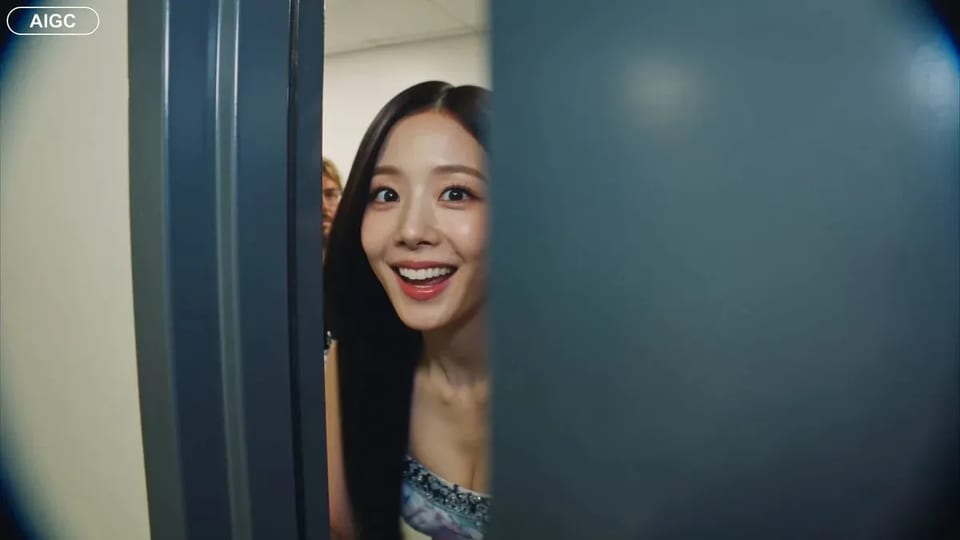
Handheld backstage idol vlog sample

CAMERA: Handheld DV 16mm camcorder aesthetic, first-person/selfie POV. CHASE always holds the camera. Natural hand shake, imperfect framing, delayed autofocus, clumsy zooms, occasional face cropping. The camcorder is never visible. LOOK: Soft vintage DV tape quality with slight blur, subtle tape noise, mild highlight bloom, flickering auto-exposure, muted contrast, natural skin tones. STYLE: Bright, playful K-pop idol vlog. Genuine smiles, eye contact, candid energy, quick handheld shots with backstage excitement. CHARACTER: CHASE, Korean female idol in her 20s. Long straight black hair, dewy skin, elegant Korean features, coral lips, large eyes, slim curvy figure. Wearing a stylish stage outfit with subtle glam makeup and sparkly earrings. SETTING: Backstage hallway of a music show studio with dressing room doors, CHASE's name tag on one door, snack table, overhead PA speaker, and blurred staff passing by. SEQUENCE: 1. Selfie: peeks into the hallway. "Hey guys, we're backstage!" 2. Whip pan down the corridor. "This hallway is so long!" 3. Stops at her dressing room, points at her name tag. "That's me!" 4. Close-up of the name tag as she taps it. Ambient audio only. 5. Quick outfit check with a spin near a mirror. "How do I look?" 6. At the snack table, grabs a snack. "Don't mind if I do." 7. Mid-bite, PA announcement interrupts. She laughs: "Wait—" 8. Selfie ending: hears the countdown, waves, makes a hand heart, then runs toward the stage. "That's my cue—see you after the stage!"

CAMERA: Handheld DV 16mm camcorder aesthetic, first-person/selfie POV. CHASE always holds the camera. Natural hand shake, imperfect framing, delayed autofocus, clumsy zooms, occasional face cropping. The camcorder is never visible. LOOK: Soft vintage DV tape quality with slight blur, subtle tape noise, mild highlight bloom, flickering auto-exposure, muted contrast, natural skin tones. STYLE: Bright, playful K-pop idol vlog. Genuine smiles, eye contact, candid energy, quick handheld shots with backstage excitement. CHARACTER: CHASE, Korean female idol in her 20s. Long straight black hair, dewy skin, elegant Korean features, coral lips, large eyes, slim curvy figure. Wearing a stylish stage outfit with subtle glam makeup and sparkly earrings. SETTING: Backstage hallway of a music show studio with dressing room doors, CHASE's name tag on one door, snack table, overhead PA speaker, and blurred staff passing by. SEQUENCE: 1. Selfie: peeks into the hallway. "Hey guys, we're backstage!" 2. Whip pan down the corridor. "This hallway is so long!" 3. Stops at her dressing room, points at her name tag. "That's me!" 4. Close-up of the name tag as she taps it. Ambient audio only. 5. Quick outfit check with a spin near a mirror. "How do I look?" 6. At the snack table, grabs a snack. "Don't mind if I do." 7. Mid-bite, PA announcement interrupts. She laughs: "Wait—" 8. Selfie ending: hears the countdown, waves, makes a hand heart, then runs toward the stage. "That's my cue—see you after the stage!"

動態工作台,不是靜圖頁

搜到這裡的人要的是線上短影片:產品揭示、社群鉤子,或必須動起來的分鏡節拍。Grok Imagine Video 1.5 是預設,因為面向瀏覽器裡 480p / 720p 的文生或首幀短片。若還需要字可讀的主視覺靜圖,先在 /image 做好——再回來這裡做動態。

短片流程

從運動需求到可下載短片

/video 上三步——靜圖仍在 /image。

  1. 1

    為了速度,從 Video 1.5 開始

    型號列表預設開啟 Grok Imagine Video 1.5,適合短時文生影片與圖生影片。需要不同觀感或時長範圍時,再切到 Veo 或 Seedance。

  2. 2

    寫運動——或放入首幀

    文生影片:點名動作與鏡頭。圖生影片:上傳靜圖(常來自 /image),只描述該動的部分,讓開場畫面仍熟悉。

  3. 3

    480p 打草稿,720p 再精修

    試節奏時用 480p。成片要審看時再上 720p。失敗任務會自動退還積分。

適合用 Grok Imagine Video 的短片任務

只談動態場景——人與任務都與靜圖頁不同。

  • Grok Imagine Video 的短影片動態概念靜圖

    短影片剪輯

    不做拍攝日也能剪 3–8 秒鉤子與轉場。Grok Imagine Video 為今晚就要的那條短片服務,不是整集長渲染。

  • Grok Imagine Video 的產品揭示動態概念

    產品上線團隊

    把包裝靜圖做成短揭示:平移、光脈衝或輕柔產品旋轉。圖生影片讓首幀仍貼品牌。

  • Grok Imagine Video 的付費社群動態概念

    付費社群製作

    同一賣點測多種動態變體。480p 便宜試,再鎖一條 720p 進廣告帳戶。

  • Grok Imagine Video 動態分鏡用的預演風格靜圖

    預演 / 動態分鏡負責人

    讓分鏡靜圖動起來,導演可先評節奏,再進完整 CG。節拍保持短而有意。

  • Grok Imagine Video 的課程講解動態概念

    課程創作者

    把示意圖靜圖做成短講解節拍。圖生影片保留熟悉的教學畫面,用運動帶走注意力。

  • Grok Imagine Video 的代理提案動態概念

    代理提案小組

    向客戶展示關鍵畫面如何動,不必預約整場製作。當天下載短片,再按回饋迭代。

動態能力

影片工作台重點保證什麼

  • 天生做短片

    Grok Imagine Video 1.5 面向秒級線上影片(視設定大約 1–15 秒)。要更長序列就多條拼接——本頁不是數分鐘離線套件。

  • 首幀圖生影片

    上傳靜圖並描述運動。開場畫面貼近你的照片,其餘片段再動起來——適合在 /image 精修好靜圖之後。

  • 480p 草稿,720p 審片

    480p 是便宜探索路徑。客戶或社群審片要細節時,720p 每秒更貴。註冊積分涵蓋預設檔短起步。

  • 自然語言文生影片

    點名主體、動作與鏡頭即可。不需要單獨 xAI 帳號或桌面安裝——在瀏覽器工作區生成。

  • Veo 與 Seedance 一鍵可換

    鏡頭需要別的站內型號時,切換即可,不必把提示詞貼到另一個網站。快速初稿仍預設 Grok Imagine Video。

  • 失敗短片自動退積分

    逾時、伺服器錯誤或過濾會退還積分。你只為實際收到的短片付費。

Grok Imagine Video 動態常見問題

Grok Imagine Video 短片最長多久?

Grok Imagine Video 1.5 面向線上短片——視執行設定大約 1–15 秒。故事更長時,生成多條再剪輯拼接。

能用 /image 裡已做好的照片起步嗎?

可以。匯出或重開該靜圖,開啟 /video,當作首幀上傳,再描述運動。這條圖生影片路徑就是靜圖工作台的預期交接。

480p 還是 720p——先選哪個?

試節奏與運鏡時先用 480p。成片要社群或客戶審看時再切 720p。更高解析度每秒消耗更多積分。

Grok Imagine Video 可以免費試用嗎?

新帳號獲贈免費註冊積分,可涵蓋一次預設檔短跑。開始免信用卡。更大用量與商用授權需購買積分或訂閱。

什麼時候從 Grok Imagine Video 切到 Veo 或 Seedance?

快速初稿與首幀動態用 Grok Imagine Video 1.5。需求需要另一型號的觀感或時長範圍時再切換——列表會保留提示詞與參考。

這個頁面能替代完整影片剪輯軟體嗎?

不能。它生成可下載、再在編輯器裡完成的短片。想的是鉤子、揭示與預演節拍——不是調色、多軌音訊或長片剪輯。

短片可以商用嗎?

付費方案含廣告與客戶專案的商用授權。免費檔短片用於個人測試,除非方案另有說明。確切條款見法律頁。

算圖失敗會怎樣?

伺服器錯誤、逾時或內容過濾會自動退積分。縮短片段、簡化運動,或先試 480p 再跑更長 720p。

用 Grok Imagine Video 做下一條短片

提示詞或首幀 · 480p 探索 · 720p 精修——註冊積分免費起步。